Beachy Dreams: The Playful, Polished Script Font That Fits Your Digital & Craft Life
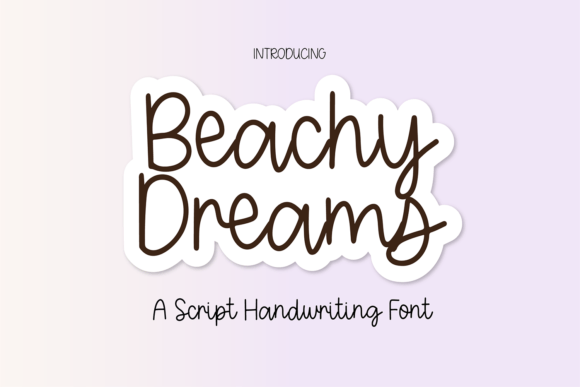
There’s a quiet magic in handwriting that feels personal—like a note slipped into a lunchbox or a name written in looping ink on a seashell. Beachy Dreams captures that warmth and spontaneity, but with the polish and precision today’s creators need. It’s not just another script font—it’s a versatile, fully-featured pen-style typeface designed for real-world use across digital tools, print projects, and hands-on crafts.
What Makes Beachy Dreams Stand Out?
At first glance, Beachy Dreams reads like effortless cursive—soft curves, gentle slant, and rhythmic spacing that mimics natural pen movement. But look closer: every glyph is carefully balanced for clarity and consistency. Unlike some decorative scripts that sacrifice legibility for flair, Beachy Dreams includes full uppercase and lowercase letters, numerals 0–9, and essential punctuation—so you can write full sentences, dates, prices, quotes, or even email addresses without switching fonts.
It’s also intentionally not overdesigned. There are no distracting swashes, alternate characters, or ornamental flourishes that clutter layouts or slow down workflow. That simplicity is intentional—and powerful. Whether you’re labeling a planner tab in GoodNotes or designing a watercolor wedding invitation, Beachy Dreams delivers charm without compromise.
Digital Planning & Note-Taking
If you live in GoodNotes, Notability, or Obsidian, you know how much font choice impacts your daily rhythm. A stiff, formal font can make journaling feel like homework. Beachy Dreams softens the screen—adding personality to habit trackers, mood logs, and weekly reflections. Its consistent baseline and open letterforms stay readable even at smaller sizes (think 14–16pt), so your bullet points and checklists don’t blur together.
Pro tip: Pair Beachy Dreams with a clean sans-serif (like Inter or Montserrat) for headings or labels. This contrast gives structure while keeping the tone light and approachable—a visual echo of how many planners balance function and joy.
Social Media & Branding
Instagram captions, Pinterest pins, TikTok text overlays—these spaces reward authenticity and warmth. Beachy Dreams helps brands sound human, not algorithmic. A boutique candle shop might use it for product names (“Saltwater Serenity”, “Tide Line Vanilla”) or limited-edition sticker packs. A wellness coach could feature it in Reels graphics announcing new journal prompts or seasonal self-care challenges.
Because it’s a single-weight, single-style font, it scales predictably across platforms. No awkward clipping on mobile previews. No missing glyphs when exporting from Canva to Stories. That reliability saves time—and builds trust with your audience.
Crafts, Printables & Home Decor
From printable wall art to handmade greeting cards, Beachy Dreams bridges digital design and tactile making. Its smooth outlines convert beautifully to cut files for Cricut and Silhouette machines—no jagged edges, no unexpected gaps between letters. Use it for monogrammed coasters, framed affirmations (“Breathe. Belong. Begin.”), or custom tea towel labels.
Print designers appreciate how evenly it inkjet-prints. No thin strokes disappearing on matte paper. No heavy ink bleed on kraft cardstock. And because it’s optimized for both screen and print, you can preview a layout on your laptop and send it straight to your local print shop—with confidence.
Practical Considerations Before You Download
Before adding Beachy Dreams to your toolkit, consider how—and where—you’ll use it most.
- Licensing matters: Check if your intended use falls under personal, commercial, or extended license terms—especially if you plan to sell physical products (like mugs or stickers) featuring the font. Most versions include clear usage guidelines, but always verify before launching a shop or campaign.
- Compatibility is key: Beachy Dreams is delivered as a standard OTF or TTF file—so it works natively in Adobe Creative Cloud apps, Affinity Suite, Canva (via upload), Figma, and Apple Pages. On iOS or iPadOS, install it via Files app or a font manager like AnyFont.
- Pairing isn’t optional—it’s strategic: While Beachy Dreams shines solo in short phrases, longer blocks benefit from contrast. Try pairing it with:
- A geometric sans-serif (e.g., Poppins) for modern balance
- A warm serif (e.g., Cormorant Garamond) for vintage elegance
- A minimalist mono (e.g., Space Mono) for tech-meets-tide vibes
- Color choices affect perception: Lighter weights of Beachy Dreams (when used at small sizes) pair best with high-contrast backgrounds—think charcoal text on ivory, or coral on cream. Avoid pale pastels on white unless you’re going for subtle watermark effect.
Real-Life Uses You Can Start Today
You don’t need a big project to begin exploring Beachy Dreams. Here are low-lift, high-impact ideas:
- Create a themed GoodNotes cover page: Use “Beachy Dreams” for your planner title (“My Summer Reset Journal”), then layer in simple line icons (a wave, sun, palm) in a neutral color palette.
- Design Instagram Story templates: Build reusable frames with “Beachy Dreams” headers (“This Week’s Wins”, “Gratitude List”, “Small Joys”)—then duplicate and update weekly.
- Make printable gift tags: Type names in Beachy Dreams, add a tiny anchor or shell icon beside each, and print on textured cardstock. Instant charm—zero calligraphy skills required.
- Personalize your desktop wallpaper: Overlay a favorite quote in Beachy Dreams on a soft-focus beach photo. Set it as your lock screen for a daily dose of calm.
- Label pantry jars or craft supplies: Print on matte sticker paper, cut by hand or machine, and stick. The font’s friendly tone makes even “Quinoa” or “Watercolor Brushes” feel inviting.
Why It Fits Modern Creative Lifestyles
Today’s makers juggle multiple roles—planner, designer, content creator, small-business owner, parent, student. Tools that simplify without sacrificing soul are rare. Beachy Dreams meets that need head-on: it’s accessible enough for beginners, refined enough for professionals, and expressive enough to carry emotional weight.
It also aligns with broader creative trends—like the resurgence of analog-inspired digital tools, the demand for cohesive brand voice across platforms, and the desire to slow down through intentional design choices. Using Beachy Dreams isn’t just about aesthetics; it’s a small act of alignment—between how you work, how you express yourself, and how you want others to feel when they see your words.
Getting Started Is Simple
No complex installation. No steep learning curve. Once downloaded, install Beachy Dreams like any other font on your device. Then test it right away:
- Type your name. Does it flow? Does it feel like *you*?
- Write a sentence with numbers and punctuation (“See you at 3:30pm!”). Are all characters present and proportionally balanced?
- Try it at three sizes: 24pt (for headers), 16pt (for body in digital notes), and 10pt (for fine print on a tag). How does readability hold up?
If the answer is consistently yes—that’s your sign. Beachy Dreams isn’t about chasing trendiness. It’s about finding a voice that fits—gently, clearly, and joyfully—across every part of your creative life.